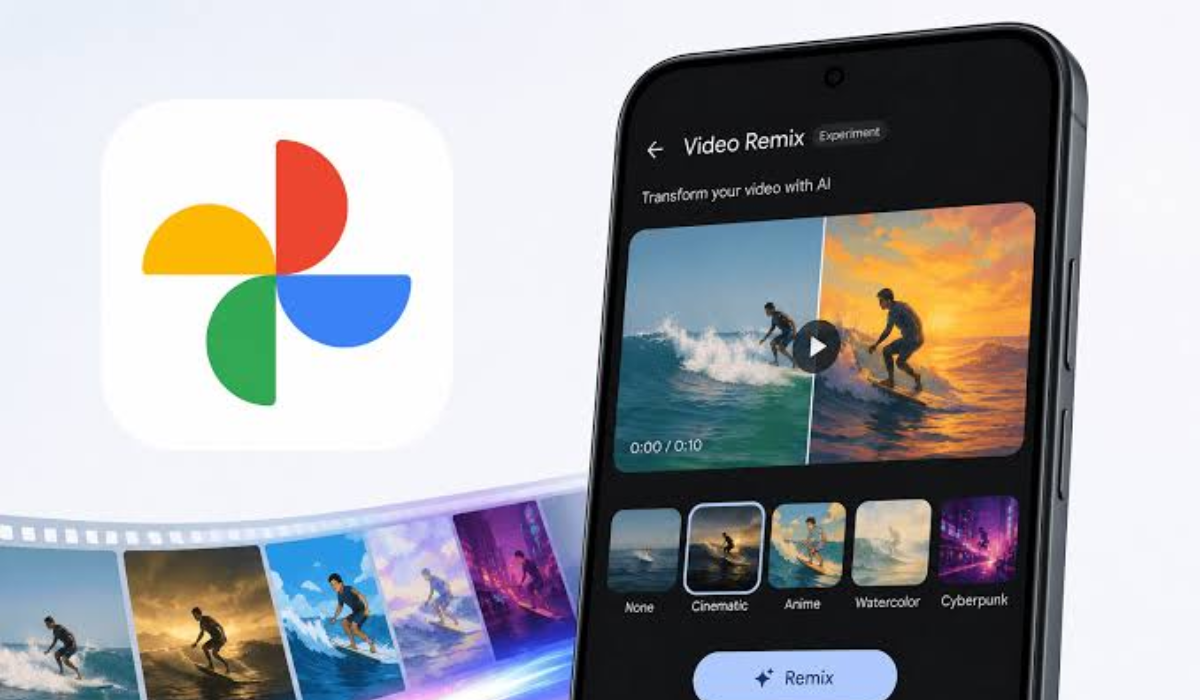


Google Photos just gained Video Remix, a Gemini Omni-powered tool that restyles your existing clips with cinematic relighting, background swaps, and artistic effects in a few taps. It lives in the Create tab and targets casual users, not professionals. There are real limits: 10-second clips, a paid subscription, and a short list of countries.
Key Takeaways
- Video Remix restyles existing clips with AI in a few taps
- It’s powered by Google’s Gemini Omni model
- Effects include relighting, background swaps, and art styles
- Clips are capped at 10 seconds and take minutes to generate
- It’s rolling out to paid Google AI subscribers in 14 countries
What Video Remix Does
The tool turns editing into tapping. Found in the Create tab in Google Photos, Video Remix lets you apply cinematic relighting to brighten a dark clip, swap a plain background for something else, or add artistic styles like watercolor, raw sketchbook, and oil painting effects.
The examples are playful. Google suggests you could make a video look as though you shot it in a greenhouse, relight a clip with a morning glow, or repaint your footage in a watercolor style, all without touching a timeline.
The workflow is template-first. Rather than trimming footage or layering effects by hand, users choose a creative template and Gemini generates a new version of the clip with a completely different look and feel.
The pitch is accessibility. Google’s framing is that beautiful clips shouldn’t require professional skills or hours of editing, positioning Video Remix as a way to turn ordinary videos into share-worthy moments in a few taps.
How It Works and What Powers It
Under the hood is Google’s newest video model. Video Remix runs on Gemini Omni, positioned as the successor to both the Nano Banana image model and Google’s Veo 3.1 video generator, engineered with a better grasp of physical forces like gravity and motion for more realistic scenes.
The heavy lifting happens off-device. Like the photo version of Remix, processing occurs in the cloud, so your clips need to be backed up to Google before the tool can generate anything.
The interface keeps things simple on purpose. Instead of granular color wheels or timeline sliders, it leans on a library of automated templates and stylistic treatments, isolating subjects to swap backgrounds or intelligently boosting exposure on poorly lit footage.
There’s a personal twist too. The feature lets users insert themselves into videos using a digital avatar created through the tool, and that AI-generated output carries Google’s SynthID watermark to mark it as synthetic.
The Limits to Know
This is not a pro editing suite, and the constraints make that clear. The biggest is length: Video Remix currently works only with clips up to 10 seconds long, so longer recordings must be trimmed to a chosen 10-second window first.
Patience is required. Generating a remix can take up to a couple of minutes depending on the edit, and daily usage limits apply, with higher allowances for paid Google AI accounts.
Access is gated and geographic. Video Remix is rolling out to eligible Google AI Plus, Pro, and Ultra subscribers across 14 countries including the US, India, Japan, South Korea, Brazil, Mexico, Argentina, Bangladesh, Colombia, Egypt, Indonesia, Pakistan, the Philippines, and Turkey. Introductory text about upgrading hints a free tier could follow later.
Where It Fits in Google Photos
Video Remix is the latest brick in a year-long wall of AI features. It joins Photo to Video, which animates still images, and Photo Remix, the image-editing tool that turns pictures into anime, comics, or 3D art.
The naming was deliberately untangled. When development was spotted under the codename “Soba,” internal strings showed Google renaming the existing Remix button to Photo Remix to avoid confusion with the new video function, splitting the feature cleanly into photo and video equivalents.
It slots into a crowded Create tab. The hub now gathers Photo to Video, Remix, collages, highlight videos, cinematic photos, and animation in one place, part of Google’s effort to make its growing pile of creative tools easier to find.
Recent additions round out the picture. Google Photos also rolled out touch-up tools for subtle fixes like removing blemishes and whitening teeth, plus a feature that turns photos of your clothes into a virtual closet for trying on outfit ideas.
Why It Matters
The bigger play is mainstreaming AI. By baking generative video editing directly into an app hundreds of millions already use, Google lowers the barrier from “download dedicated software” to “tap a template,” giving people another reason to stay inside its ecosystem.
The competitive context is clear. The launch is Google’s latest move to stuff generative AI into its consumer apps as it races Apple, OpenAI, and Adobe, each trying to own the moment casual users reach for an AI tool.
The audience question answers itself. Serious creators will stick with desktop suites and manual controls, but Video Remix isn’t built for Hollywood. It’s built for the person who wants to fix a dim birthday video or add a fun filter to a pet clip before dropping it in the family group chat, and for that job, a few taps may be exactly enough.
Digital Trendings is your trusted source for AI news and updates, stay tuned for more.


